
TL;DR — generated with AI
Standard testing advice falls flat when most of your codebase is a CMS or framework you didn’t write. There is zero value in unit testing vendor code. Instead, shift your automation strategy to where failures actually cost the business money or reputation.
Prioritise End-to-End and integration tests for critical conversion paths, such as booking forms syncing to a CRM or third-party payment gateways. Reserve unit tests exclusively for complex, isolated business logic you own entirely (like bespoke pricing rules), and only adopt visual regression testing if the business has the budget to cover the maintenance overhead.
Building a corporate website usually means assembling components from external libraries more than writing code from scratch. The CMS will handle database queries, authentication, and admin controls. Frameworks like Laravel will manage routing and ORM. Third-party plugins will handle form submissions, SEO, or caching. The code you actually write represents a small fraction of how these sites function, and that is what makes building a corporate website such an agile and cost-effective process.
Most testing articles assume you’re building everything yourself:
" Write unit tests for all your functions.
" Aim for at least 80% coverage.
" Follow the testing pyramid.
That advice doesn’t translate when most of your codebase comes from external dependencies.
So when the majority of code comes from frameworks and plugins, what needs testing? Should you test WordPress’s get_posts() function? Verify that Laravel’s routing works?
The answer depends on what you’re building and where failures actually hurt.
The different types of tests
Before getting into what makes sense for corporate sites, let’s clarify what we mean by automated testing. Three types of tests come up repeatedly in testing discussions. They differ in scope, speed, and what they actually verify.
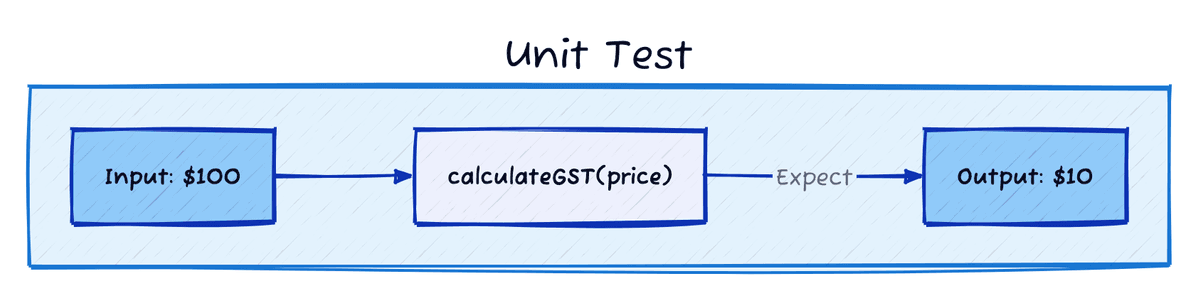
Unit tests verify individual functions in isolation. You pass in some input, and expect a specific output. If you wrote a function that calculates GST on a price, a unit test would verify it returns the correct amount for different price inputs. It’s fast to run and simple to write, but they only test one teeny-tiny piece of the puzzle at a time without any surrounding context.
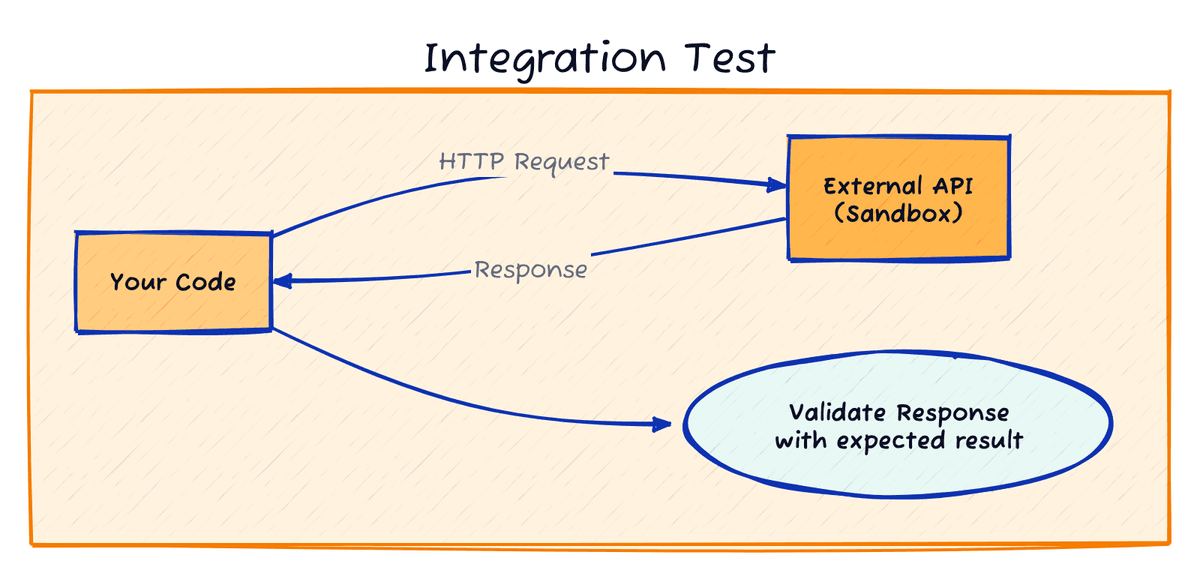
Integration tests verify that different parts of your system work together correctly. If you’re calling an external API, an integration test makes an actual HTTP request to that API (usually a sandbox environment) and checks that your code handles the responses correctly. They’re slower than unit tests because they involve network calls or database queries, but they ensure that two different systems can work together as expected regardless of how these systems evolve and change.
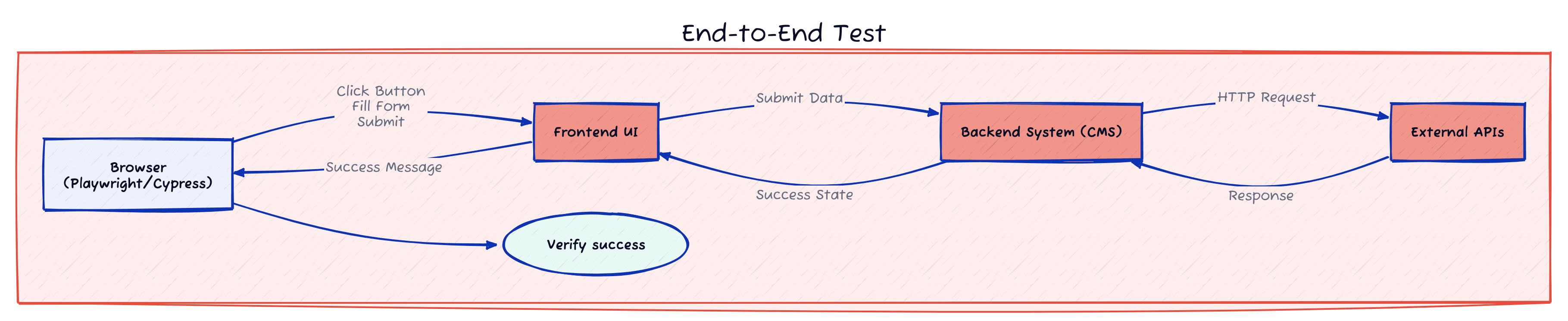
End-to-end tests (E2E) simulate real user interactions in a browser. Tools like Playwright or Cypress can test complete journeys: click a button, fill the form, submit it, and verify the success message appears. Slowest to run, most expensive to maintain, but they test the entire flow from frontend to backend exactly as users experience it.

Which one is the right tool to use? Well, Kent Beck, who helped develop Test-Driven Development, once said he gets paid for code that works, not for tests. When most of your code comes from external sources, testing the complete user journeys and integrations between systems will probably give you the reassurance you’re after, but as always, it depends.
Testing conversion flows
Consider a veterinary clinic’s website. A local practice with three vets seeing maybe fifty appointments per day. They’re using WordPress with a custom theme. You’ve built a contact form for appointment requests that posts to their practice management software, and another form for general enquiries that goes to their email.
What failure points could actually hurt the business?
It might be that the contact form breaks and someone trying to book an urgent appointment for their pet gets an error message. Or maybe a form submission failed silently and nobody at the clinic knows an enquiry came through. It could even be that the integration with their practice management software stops working and appointments don’t get recorded and nobody knows.
An end-to-end test for the contact form would pick up on a mixture of integration, validation, and UI issues. We could test something like:
- Navigate to the contact page
- Fill in name, email, phone number
- Select an appointment type from the dropdown
- Enter a message describing the issue
- Submit the form
- Verify the success message appears
- Check that the submission reached the practice management software
The test runs in an actual browser. Assuming that the frontend of the site catches all possible errors from the backend, this test alone could flag any integration issues between your form validation, the practice management API, and error handling across different browsers.
Zalando, for example, runs Playwright tests every 30 minutes in production to catch issues before they impact customers. They test critical journeys like browsing products, applying filters, and adding items to cart. When React hydration broke on their product pages due to incomplete CMS content, their end-to-end tests caught it before it became a major incident. You can read about their approach in their engineering blog.
But E2E tests wouldn’t flag silent failures like missing appointment records or the backend not sending emails when it should. For that, integration tests are also a good idea.
Testing third-party API integrations
Integration tests verify the backend behaviour directly, without relying on the frontend to surface errors. For the vet clinic, you’d test the actual integration code:
test('appointment submission creates record in practice management system', async () => { const appointment = { clientName: 'John Doe', phone: '0412 345 678', petName: 'Luna', appointmentType: 'general-checkup', preferredDate: '2025-02-15', message: 'Luna has been limping on her front left paw' };
const result = await submitAppointment(appointment);
expect(result.success).toBe(true); expect(result.appointmentId).toBeDefined();
// Verify the appointment actually exists in their system const pmRecord = await practiceManagementAPI.getAppointment(result.appointmentId); expect(pmRecord.petName).toBe('Luna');
// Clean up - delete the test appointment await practiceManagementAPI.deleteAppointment(result.appointmentId);});
test('successful submission sends notification email to clinic', async () => { const appointment = { clientName: 'James Mitchell', phone: '0423 456 789', petName: 'Max', appointmentType: 'vaccination', preferredDate: '2025-02-20', message: 'Annual vaccination due' };
const result = await submitAppointment(appointment);
// Verify the clinic got notified about the new enquiry expect(emailService.send).toHaveBeenCalledWith({ subject: 'New appointment request - Max (Vaccination)', body: expect.stringContaining('James Mitchell'), });
// Clean up await practiceManagementAPI.deleteAppointment(result.appointmentId);});
test('failed submission sends alert email to clinic', async () => { const appointment = { clientName: 'Sarah Chen', phone: '0412 345 678', petName: 'Luna', appointmentType: 'general-checkup', preferredDate: '2025-02-15', message: 'Luna has been limping on her front left paw' };
// Force an API failure jest.spyOn(practiceManagementAPI, 'createAppointment').mockRejectedValue( new Error('API unavailable') );
await submitAppointment(appointment);
// Verify the clinic got notified about the failure expect(emailService.sendAlert).toHaveBeenCalledWith({ subject: 'Appointment submission failed', body: expect.stringContaining('Luna') });});These tests call the external API directly. They verify appointments are actually created in the practice management system, not just that the frontend shows a success message. They confirm notification emails get sent when appointments are submitted successfully, and alert emails go out when things break, even if the user sees a generic “try again later” message.
Stripe provides excellent testing infrastructure for payment integrations. They maintain test mode API keys that return realistic responses for different scenarios: successful charges, declined cards, authentication required. Companies like Gumroad and Paddle run integration tests against these sandboxes continuously. When Stripe changes their API response format, these tests fail before anything reaches production.
Testing complex business logic
Sometimes you write substantial custom logic that doesn’t depend on frameworks or external services. Pure functions that take inputs and return outputs. This is where unit tests make complete sense.
Say you’re building a booking system for a campground. You’ve written logic that determines availability based on complex rules: some sites allow caravans, some don’t. Some sites close during winter. Holiday periods have different pricing. Families with kids get priority for certain areas. Groups larger than six need special approval.
That’s proper business logic. You wrote every line, and you should test it thoroughly:
test('winter sites close between June and August', () => {  const site = new CampSite({ winterClosed: true });  const julyDate = new Date('2025-07-15');
  expect(site.isAvailable(julyDate)).toBe(false);});
test('family-friendly sites prioritise bookings with children', () => {  const site = new CampSite({ familyFriendly: true });  const familyBooking = new Booking({ adults: 2, children: 2 });  const coupleBooking = new Booking({ adults: 2, children: 0 });
  expect(site.getPriority(familyBooking)).toBeGreaterThan(    site.getPriority(coupleBooking)  );});
These tests run in milliseconds with no network calls or database queries. Just your logic against different inputs. When you change the winter closure rules next year, these tests catch regressions immediately.
When you have complex business logic, unit tests are actually an excellent way to document it. Other devs that get onboarded can quickly get up to speed on the critical logic, and the system will ensure that any changes to the website won’t break the agreed logic.
For that, you should always test code where you made meaningful technical decisions and logic exists independently of any framework.
Testing visual consistency
More than once I’ve experienced the issue where a module that was designed when the website was launched, eventually changed its layout and could look even broken on some devices.
Visual regression tools like Percy, Chromatic, or BackstopJS capture screenshots of pages at different viewport sizes and compare them against approved baselines. When you deploy changes, these tools identify pixel-level differences.
Shopify’s Polaris design system uses Percy for visual regression testing. Their public GitHub repository shows Percy running on every pull request, catching CSS changes that affect button styling, form layouts, or component spacing across their merchant admin interface. When thousands of merchants rely on consistent UI patterns, automated screenshots catch problems that manual QA can’t scale to test.
Visual regression testing adds another layer of review to your development workflow. Every CSS change requires someone to examine screenshots and approve or reject the differences. If you change the padding for the button component, you’ll be reviewing dozens of screenshots across viewport sizes across the whole website. For organisations where brand consistency is non-negotiable and the budget exists for this level of polish, the maintenance overhead is completely worth it.
What actually makes sense for a corporate site
Testing should reduce deployment anxiety and not create it. If tests are constantly failing, or they never ever fail, then something might be wrong in the process.
Start by testing conversion points: booking forms, contact forms that post to the CRM, newsletter signups… These directly impact business outcomes. E2E and integration tests verify these flows work, catching failures where your code meets third-party services.
Add extra integration tests for any external dependencies: payment providers, shipping calculators, inventory systems, webhooks… Verify your code handles their responses correctly.
Write unit tests if you have complex business logic that you own completely: pricing calculations, availability rules, validation algorithms, data transformations… If you find yourself adding documentation for a chunk of code, consider if that should be a unit test instead.
Consider visual regression testing when the brand presentation is critical for the business (think of luxury brands or financial institutions) and the budget allows for the maintenance overhead.